CB App v3 is out
CB App v3 ships as a single offline HTML file — lock buttons on every window, a real Download .html export, light and dark themes, and sticky notes with one-click Copy and Reset.
CB App is a multi-window workspace in one HTML file — notes, tasks, sticky notes, calculator, clock, log. No install, no server; offline after the first open. I built it for locked-down Enterprise Browser setups where clipboard and normal web features get blocked. Today it's v3.0.3: same idea, cleaner day-to-day use.

Short list only: the changes that actually change how you use it. Full history is in the changelog.
Lock buttons on every window
Every window can lock — notes, sticky notes, task lists, calculator, clock, log, help. Lock freezes content, drag, and resize; text stays readable, scrollable, and selectable. Useful when a sticky note is where you want it and you don't want the next drag to send it halfway across the canvas.
Download .html that actually works
The export button is the one control that writes a file to disk — it lights up red so you don't confuse it with the rest of the chrome. Earlier builds serialised the live DOM: empty textareas, dead windows with no listeners, duplicates on the next open. v3 writes a clean document and embeds your session as JSON. Open the downloaded file once; the workspace comes back. After that, local edits win — the way a real local app should behave.
Light and dark themes
Both themes are first-class and meet WCAG AA contrast across the UI. Sticky notes follow the active theme unless you've deliberately recolored them. One toolbar click flips the whole workspace — no half-themed windows left stranded on the wrong palette.
Sticky notes: one-click Copy and Reset
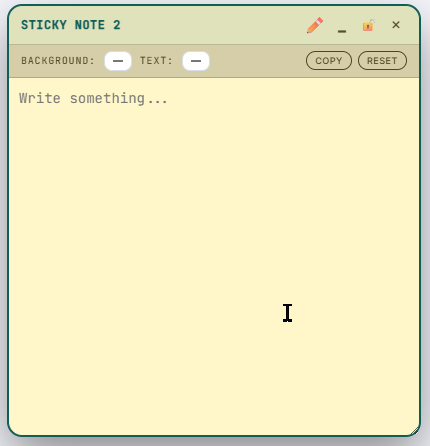
Sticky notes now carry Copy and Reset in the toolbar. Copy puts the note text on the clipboard in one click. Reset drops custom background and text colors back to the theme defaults — the escape hatch when you recolor a note dark, switch the app to light mode, and suddenly can't read the toolbar.
Get it
Launch it at phbeks.com/cbapp — or save the page and work fully offline. About 185 KB, one file, no account.
Source: github.com/deokman420/cbapp
Comments