My go-to prompt starter: Rewrite for Clarity
How I use Prompt Composer's Eval "Rewrite for clarity" mode to turn a messy, typed-as-I-think prompt into a clean structured frame — before/after screenshots and the one rule I never skip.
Most of my prompts don't start out clean. They start out as whatever's in my head, typed in one breath, half-instruction and half-thinking-out-loud. That's fine — that's how ideas actually arrive. The trick is not sending them like that.
So this is my go-to for simple prompt starters: the "Rewrite for clarity" mode inside Prompt Composer's Eval tool. I type a prompt the way I normally would, in any prompt window, and the rewrite takes that everyday brain-dump and turns it into a structured output frame. Then I clean it up and send it on. That's the whole loop.
The messy part (this is allowed)
Here's a real one. I wanted a blog post written — this one, actually — so I just said so, in plain run-on English. No structure, a stray placeholder note to myself, a typo or two. Exactly what you'd type if you weren't trying to be tidy:
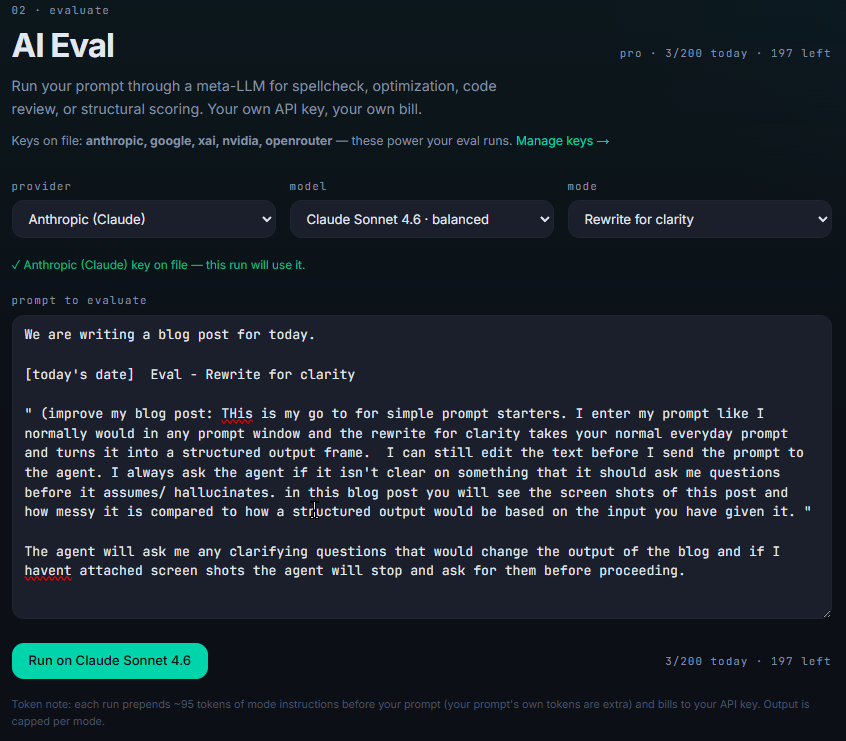
Notice what I'm not doing. I'm not labelling sections, not deciding what's a goal versus a constraint, not worrying about order. I picked a provider and model, set the mode to "Rewrite for clarity," and dumped the idea in. The point of the tool is that I don't have to be organized at this stage.
The clean part (this is the tool's job)
Hit run, and the same idea comes back as a frame. Role, Goal, Context, Bounds, Task, Success — the loose notes sorted into labelled sections, with nothing of mine invented or dropped:
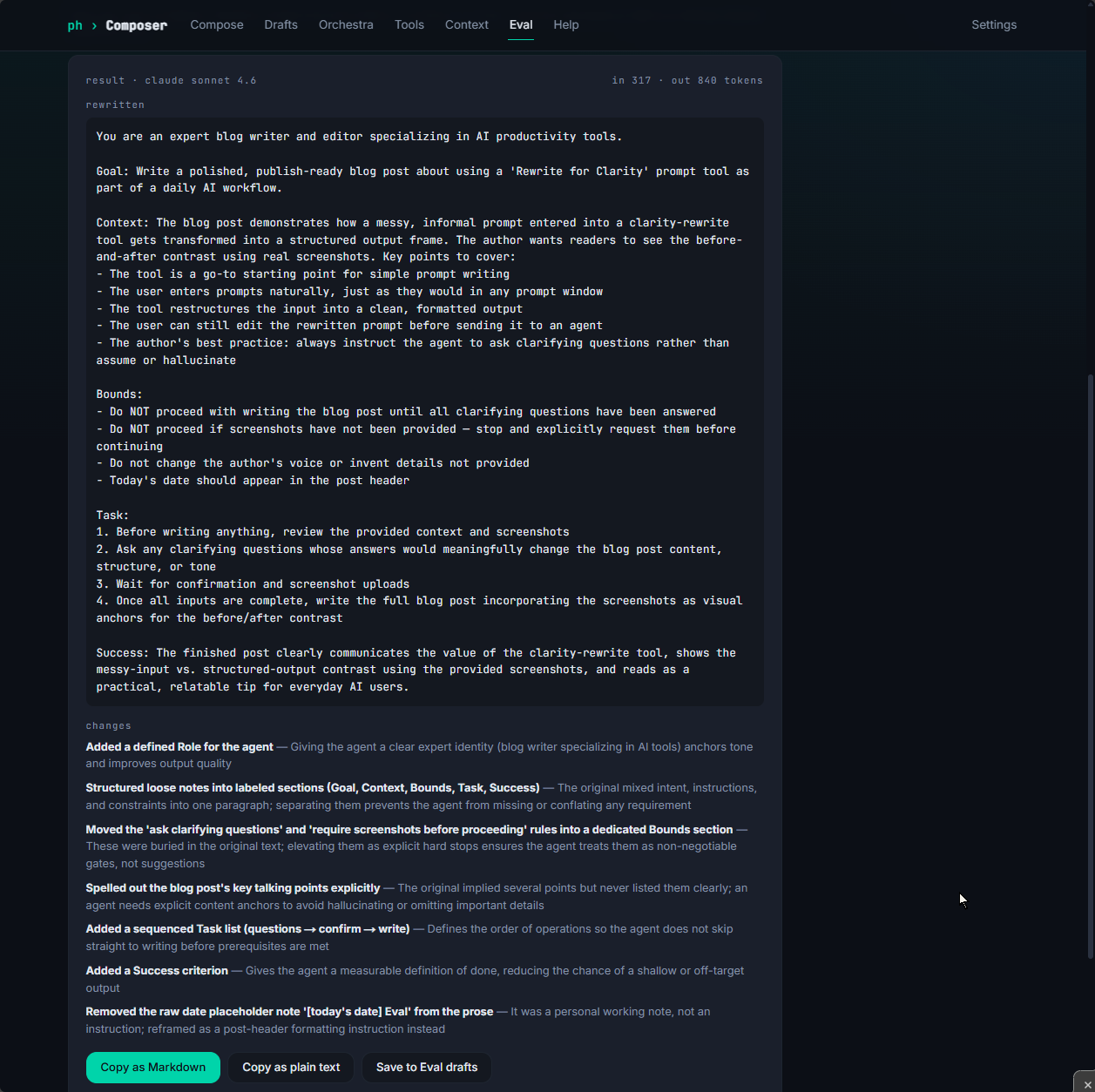
The before/after is the whole pitch, really. Same words from me, but now there's a defined role, my requirements are separated so the agent can't conflate them, and the things I'd buried mid-sentence — "ask me if it isn't clear," "stop if I haven't attached the screenshots" — got lifted out into explicit bounds. The little "changes" log underneath is the part I didn't expect to love: it tells me what it restructured and why, so I'm never just trusting a black box.
I still get the last word
This is the bit people miss: the rewrite isn't the final prompt, it's a draft. The output is fully editable. If the tool tightened something I wanted loose, or guessed at emphasis I didn't mean, I fix it right there before it ever reaches an agent. Then I copy it out as Markdown or plain text — a clean artifact, not a throwaway chat message.
So the flow is: think messily, let the tool structure it, edit the structure, send. Three of those four steps are mine. The tool only owns the one I'm bad at.
The one rule I never skip
If you take a single habit from this, take this one. I always tell the agent to ask me clarifying questions rather than assume or hallucinate. Any time something's ambiguous, I'd rather get a question back than a confident wrong answer built on a guess.
When the prompt isn't clear, the agent should ask — not invent. A question costs me ten seconds; a hallucinated answer costs me the whole output.
It's a small line to add, and "Rewrite for clarity" is good about keeping it — in the run above it even promoted that instruction into a hard bound on its own, which is exactly where it belongs. A clear frame plus a standing order to ask before assuming is most of the way to an agent that does what you actually meant.
That's it. Type messy, rewrite for clarity, edit, ship. If you want to try the mode yourself it's in the Eval tab at prompt.phbeks.com — and if you want the longer argument for why prompts are worth composing at all, that's over here.
Comments